Project Type
- R&D prototype
- Virtual character pipeline
- Real-time dialogue prototype
- Unity editor tooling
- Facial animation workflow
- Client pitch support
Platform / Tools
- Unity
- Character Creator
- Custom Character Creator facial profile
- Custom Unity editor tool
- Text to speech API
- Blender
- C#
- Unity Animator
Overview
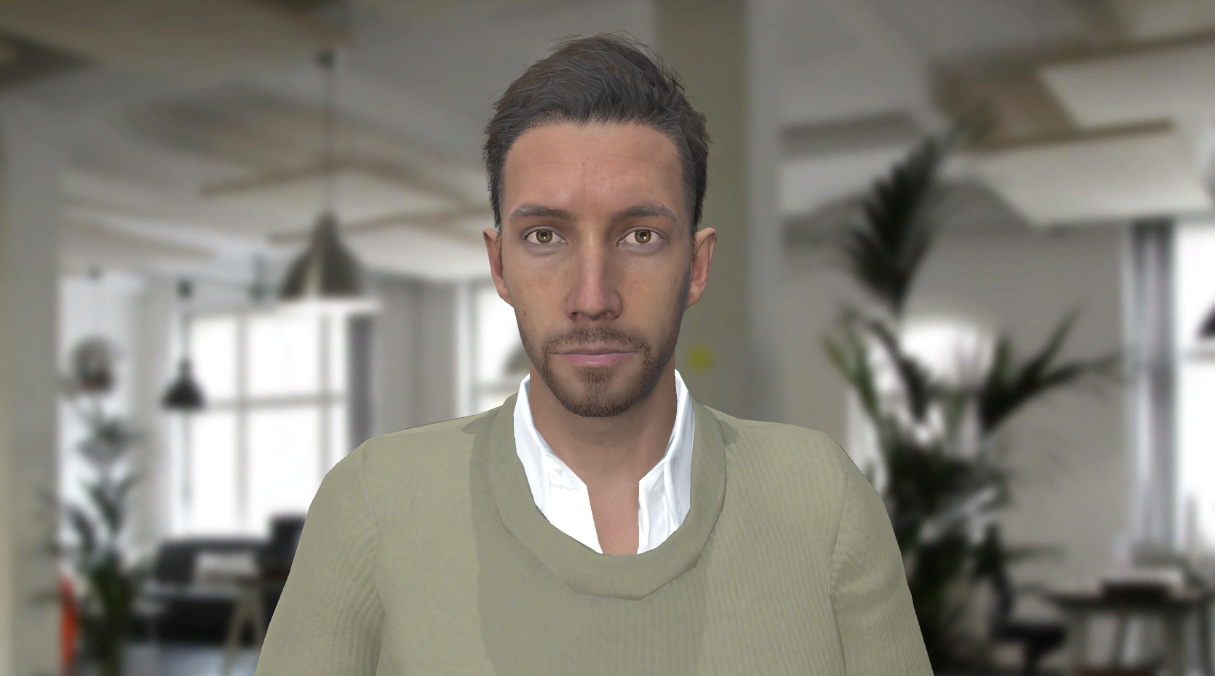
This project was a prototype pipeline for creating a real-time virtual character in Unity that could be connected to a text-to-speech API, lip sync dynamically, and animate facial expressions during dialogue.
The goal was to create a character workflow that could support real-time spoken responses, rather than relying on manually authored dialogue animation for every line.
Due to scope, time and budget considerations, the character came from Character Creator, but the model needed a specific blendshape and viseme setup before it could work correctly with the lip sync and dialogue API in Unity.
Context
Animating real-time 3D characters, particularly dialogue and facial expressions, is time-consuming. In previous projects this type of work had often relied on external character animators or manually authored animation.
For this prototype, I needed to explore whether we could create a more flexible pipeline where a virtual character could deliver dynamic real-time dialogue, driven by a text-to-speech API and facial animation system.
This was intended as an R&D prototype, but the workflow later became useful for client pitches that required a virtual character capable of delivering real-time dialogue.
My Role
Through my own initiative, I researched and developed the character pipeline from Character Creator into Unity.
I created the character model and the facial blendshape profile in Character Creator, brought the model into Unity, investigated the viseme and blendshape requirements, and worked through the limitations of the available tools.
A key part of my work was identifying that the problem was not simply whether the character had the correct blendshapes, but whether those blendshapes were available in the correct order and format for the dialogue and lip sync API.
When I could not solve that issue in Character Creator, Unity, Blender, or any other available software, I created a custom tool inside Unity that allowed me to modify and reorder the blendshape data so the character could match the API requirements.
Problem
On a broader scale, the problem was relying on a 3d character artist to manually create and edit visemes, with our artist being in high demand. The more specific problem was getting a Character Creator model into Unity with the correct facial blendshape and viseme setup for real time dialogue animation.
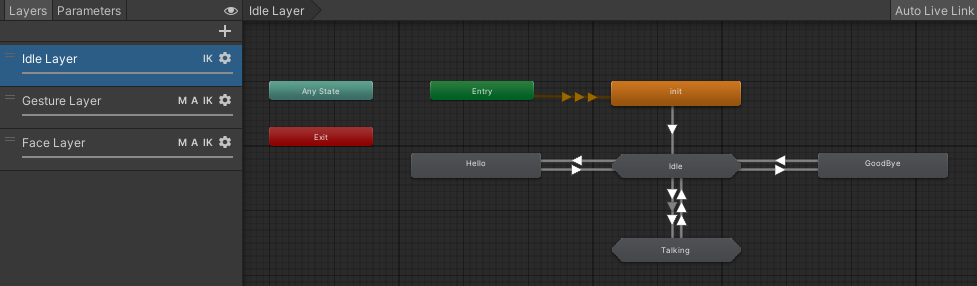
The character needed to support lip sync and facial expression animation driven by an external system, rather than manually animated dialogue. This set up dynamically animated lip sync, facial expression as well as any full body animations, using Unity’s animation system.
Character Creator could create and export facial profiles, but the standard profiles were not compatible and also somewhat generic when it came to expressions. The exported model did not align correctly with the blendshape and viseme requirements of the API.
The issue came down to the blendshape data itself, particularly the ordering and structure of the visemes. The tools I had available did not provide a reliable way to edit the blendshape index order after export.
Constraints
The biggest constraint was toolchain limitation.
Character Creator, Unity, Blender and the other tools I had access to could expose the blendshapes, but they could not solve the specific problem I had: reordering and modifying the blendshape data so it matched the expected API configuration.
There was also a practical production constraint. This needed to be a repeatable workflow, not a one-off fix buried inside a single character file.
If the prototype was going to be useful for future pitches or production work, the solution needed to live inside the Unity pipeline where other characters could potentially be processed in the same way.
Approach
I started by creating a custom facial profile in Character Creator, defining the blendshapes and visemes needed for the Unity dialogue setup.
I then brought the character model into Unity and tested the facial animation requirements against the text-to-speech and lip sync system.
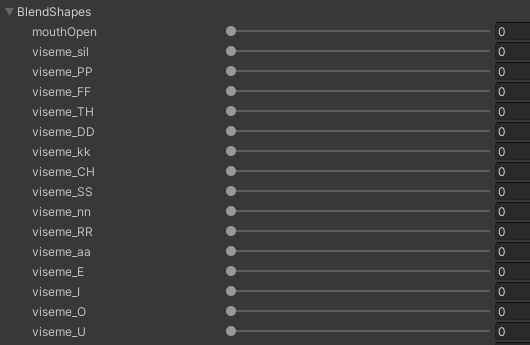
Once I found that the blendshape indices did not align with the API requirements, I investigated whether the issue could be fixed in Character Creator, Unity, Blender, or through the exported asset settings.
None of the available tools gave me the control I needed, so I created a Unity editor tool to process the mesh data directly.
The tool allowed me to work with the blendshape data inside Unity, remove unnecessary or non-functional blendshapes, and rebuild the mesh with the required blendshapes in a usable configuration.
Custom Unity Tool
The custom Unity tool was created to solve a very specific pipeline problem: the character had the required facial data, but the data was not structured in the way the runtime system expected.
The tool processed selected meshes inside Unity, inspected their blendshapes, filtered them against a specified list, checked whether blendshapes were functional, and created a new mesh with the cleaned blendshape data.
This gave me a way to control the final blendshape set inside Unity, rather than being blocked by the limitations of the export tools.
It also meant the solution could become part of a repeatable Unity-side workflow instead of a manual workaround.
Key Technical / Design Decisions
- Use Character Creator as the source for the character model and facial profile.
- Create a custom facial profile rather than relying on the default Character Creator setup.
- Bring the character into Unity and test it against the actual runtime dialogue and lip sync requirements.
- Investigate whether the blendshape index and viseme ordering problem could be solved in existing tools before building a custom solution.
- Create a Unity editor tool to modify and rebuild the blendshape data inside the Unity pipeline.
- Filter the blendshapes down to the required set rather than carrying unnecessary facial data into the runtime character.
- Check whether blendshapes were functional before including them in the processed mesh.
- Make the solution repeatable so it could support future virtual character prototypes and pitches.
Outcome
The prototype produced a working Unity-side pipeline for preparing a Character Creator model for real time dialogue animation.
The custom tool solved a practical blocker in the character workflow by giving me control over blendshape data that the standard tools did not expose in a useful way.
The workflow was later used in various client pitches where we needed to demonstrate or propose virtual characters capable of dynamically delivering real-time dialogue.
For me, the project was a useful example of practical technical design: identifying where the available tools failed, finding the actual data-level problem, and building a focused Unity tool to make the pipeline work.
Skills Demonstrated
- Unity prototyping
- Unity editor tooling
- C# scripting
- Character Creator workflow
- Facial animation pipeline
- Blendshape editing
- Viseme setup
- Lip sync workflow
- Text-to-speech integration
- Runtime character animation
- Technical R&D
- Pipeline problem solving
- Client pitch prototyping
- Toolchain debugging